back home

projects

focus cat

a focus app to help you stay productive.

sep 2025 - april 2026

homeBuddy

helping seniors age at home instead of in care facilities.

nov 2026

3rd place at WiE hackathon

more projects coming soon!
for now, keep scrolling and watch the flowers grow :)

focus cat

github ↗

a cozy pomodoro app where every minute focused buys you something new to decorate your cat's room.

built with

  • Java
  • JSON/Gson
  • JFreeChart
  • Maven

built for a real client!

four core features

  1. timer: pomodoro timer (alternates between 25-minute work sessions with 5-minute breaks) or choose your own custom timer (any length of time). more time focused = more coins
  2. to-do list: add, edit, reorder, sort tasks by date. undo/redo actions with ctrl z / ctrl y
  3. store: spend coins from timer on background items (cats, room decor)
  4. productivity tracker: a graph of your hours focused, viewable by week, month, or year

the problem

My client, a third-year university student balancing classes and running a club, struggled to keep track of deadlines and stay focused once she sat down to work. Every focus app she'd tried fell short: missing key features, frustrating to use, or too expensive. She wanted one free laptop app to manage her tasks, stay focused, and actually enjoy using, so I built it for her. I also surveyed other students to see whether this was a wider problem. Most wanted to work about 5 hours a day but managed closer to 3, and everyone who had tried a focus app rated it 5/10 or lower.
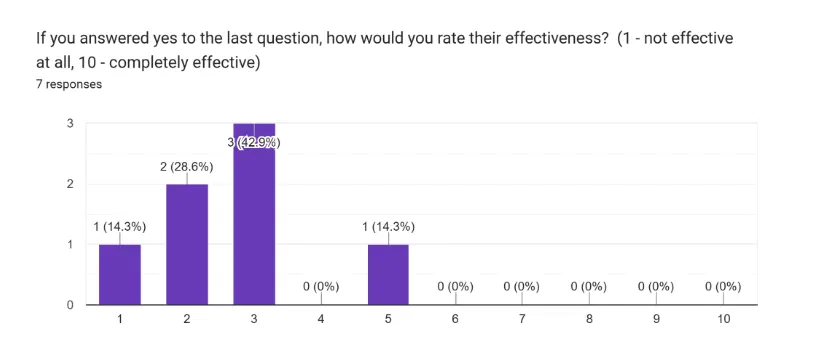
Bar chart: 7 students rated focus apps they'd tried; every rating was 5 out of 10 or lower
how effective students rated the focus apps they'd tried (1–10)

iterations

Initial wireframe of the timer screen: a large 00:00:00 with a start button
initial wireframe (timer screen)
Updated wireframe: arrow buttons to change hours, minutes and seconds
updated wireframe (pomodoro timer)
Wireframe after feedback: work/break label, pause, resume and skip buttons
updated wireframe (custom timer)

After client feedback: the timer was buried in a menu, so I moved it to the home screen. the pomodoro timer now has pause/resume/skip controls, while the custom timer moved to a secondary panel.

visual design

design mockups

goal: make it feel like a cozy room, not a productivity tool. hand-painted every background and all the store items to achieve this effect!

code architecture
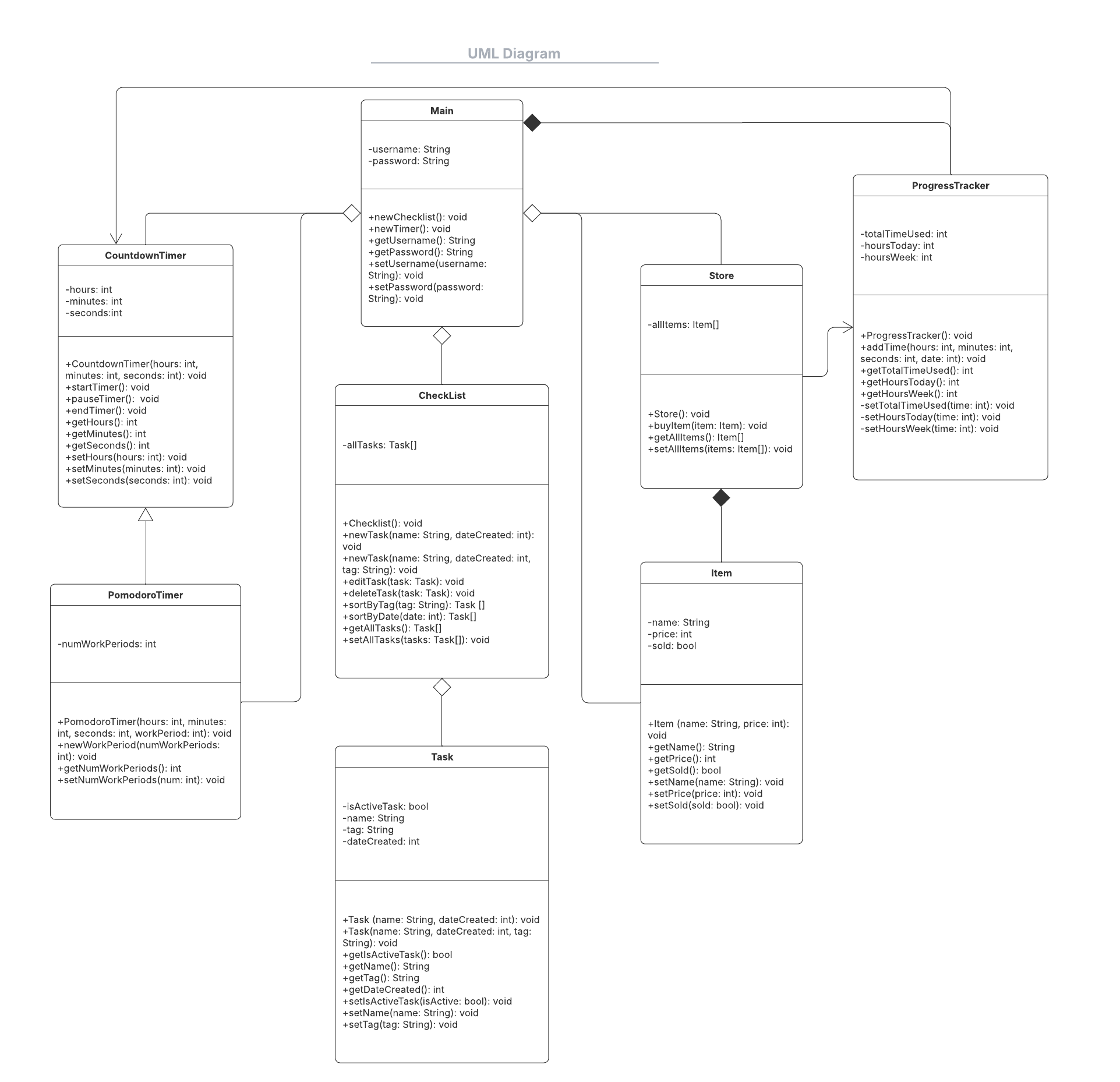
Initial UML class diagram
initial uml diagram
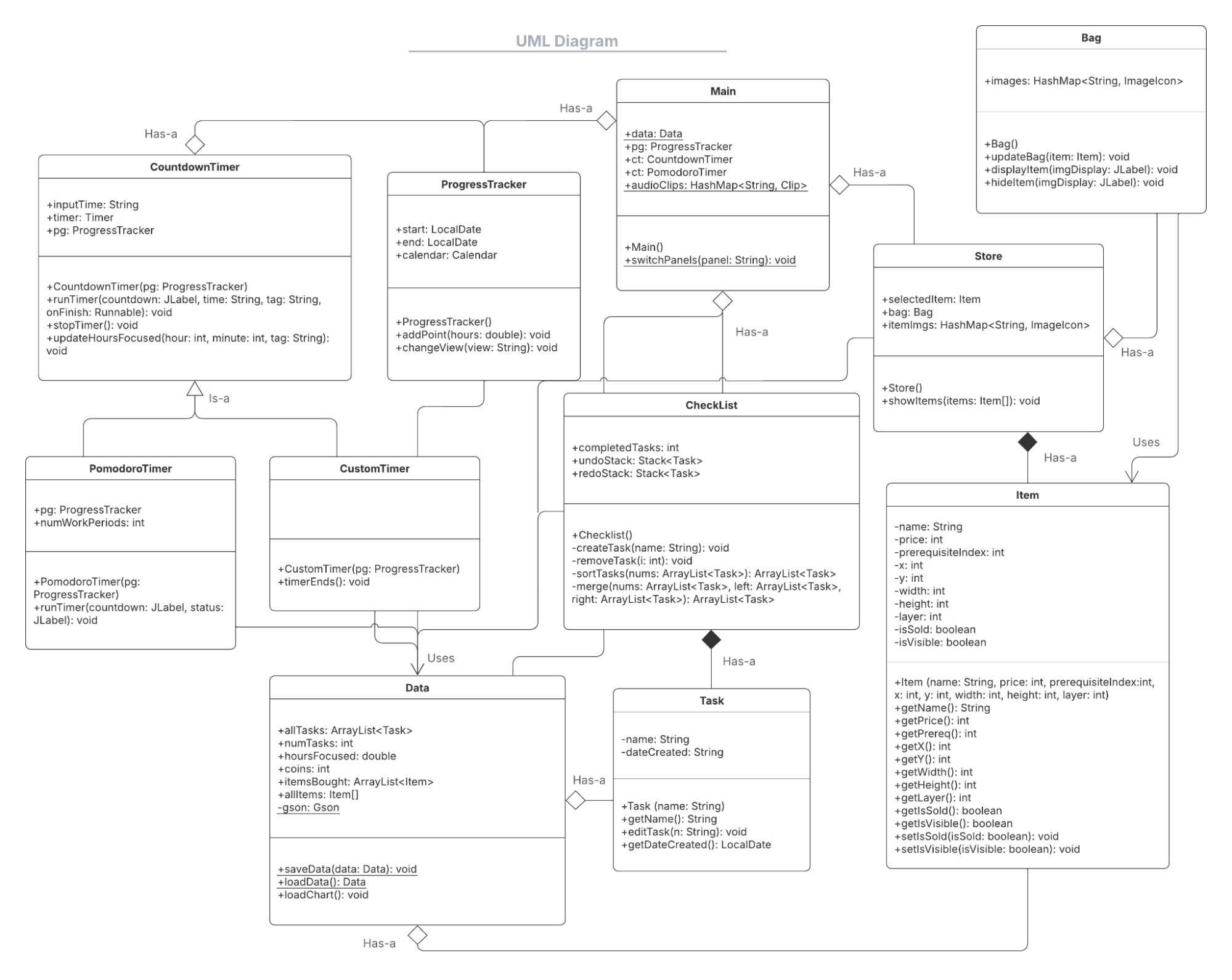
Updated UML class diagram
updated uml diagram

updates to the structure:

  • removed login (use local storage through gson instead)
  • split timers into Pomodoro and Custom subclasses
  • gave the checklist undo/redo stacks

reflection + what's next?

Building for a real person changed how I designed. My first wireframes missed a few key details my client was looking for, like the custom timer. but after her feedback, I restructured the app to match her requests. It taught me to take the design process slowly and check in at each stage, so I could catch mismatches in expectations before building on them.

future improvements:

  • block distracting websites during focus sessions
    • implementation: create a chrome extension using HTML and JavaScript that can sync to the app
  • cloud sync and backup
    • allows saving data across multiple devices
    • extra layer of security so data is saved even if local file is destroyed
    • implementation: use an API such as Google Drive API

full documentation available on request

homeBuddy

test it out! ↗ github ↗ devpost ↗

bringing the reassurance of a nursing home's daily check-in to seniors aging at home, through one simple voice call a day.

built with

  • React + TypeScript (TanStack Start)
  • Tailwind CSS
  • Google Gemini Live API (live voice)
  • Supabase
  • Figma (web design)

the problem

Seniors living independently often face slow-building health issues like missed meals, growing fatigue, dehydration or skipped medications. These go unnoticed until they end in an emergency room visit. Existing health portals don't help much: they expect seniors to type, log in and navigate complex screens, which many find frustrating or inaccessible.

features

  • voice check in
    • senior has a daily voice call with AI, who asks the care team's questions
    • live transcript during the call, then an easy-to-read summary
  • 3 logins - patient, family, care team
    • patient - just talk: no typing and no menus to navigate
    • family - read only view of the patient’s details
      • today's check-in status and care team notes
      • securely linked to a senior through a unique invite code
    • care team - ask & answer questions, update care plan, manage alerts
      • overview of all assigned seniors, sorted by alert severity
      • an alert can only be marked handled once the team logs what they did
  • accessible design
    • high-contrast colours and warm, friendly illustrations
    • Atkinson Hyperlegible type, designed for readability by older adults and busy care providers